API Test node in Workflows
The Workflow designer has two API Test nodes, Run API test collection and Run API test case. They run published API Test content as a step of a workflow, and the workflow's Run History shows the test results.
Before you start.
- Access to the Workflow Builder (Workflow Builder).
- A published collection. A draft cannot be pinned by a workflow (publish it first).
- An environment for the collection to run against.
- The person who starts the workflow needs the API Test permissions the node uses, for example View Environment and Run Test (Permissions).
The two nodes
In the Designer tab the workflow shows Start, one or more "Run API test…" nodes with the subtitle "API Test · collection · version", and End. The header has Test Run, Semantic Check, Save and Publish.
Selecting the node "Run API test collection" opens its panel with Parameters and About tabs. The Parameters tab has API Test Collection, Version and Environment. Hovering over the node shows a tooltip that explains what it does.
The node "Run API test case" has the same parameters plus a Case. Its panel also lists the values it publishes into the run context (ok, code, message, http_status and so on).
Both nodes call the real system under test, so use them deliberately. Draft changes do not run until the collection is published.
| Parameter | Node | Options & function |
|---|---|---|
| API Test Collection (required) | both | Only published collections are listed. "A draft cannot be pinned by a workflow." |
| Case (required) | case node only | Selects one case of the chosen collection, shown as "TC-01 · name"; its id is saved in the workflow. |
| Version (required) | both | v<n> (pinned) for each published version, or Always latest published. "Pinning is the default. 'Always latest' is offered but warns that publishing can change what this workflow runs." |
| Environment (required) | both | An environment the collection already defines; the collection default is marked "(collection default)". "It does not inject values." |
| Scope | collection node | Fixed: Whole collection. "Running a single case is a module action from the Case Editor" (or use the case node). |
| Repeat the collection | collection node | Runs the collection this many times (1–20), producing that many run records in one group. Case-level and dataset-level repetition are authored in the collection and apply on every pass. |
| Stop | collection node | Never / On first failed pass. Only applies when the collection repeats more than once. |
| Published into run context | both | The outputs listed below. |
| Open collection in API Tests | both | Opens the chosen collection; Back returns to the workflow. |
About tab (collection node): queues a run of the selected collection's published version: the whole collection, or one case. It calls the real system under test, so use it only when you mean to. Draft changes do not run until you publish the collection. After queueing, the node waits a short time and returns the result of each run; a run that is still going is reported as not finished.
Outputs you can use in later nodes
Each node publishes its outputs into the run context. Reference them from later nodes (for example in a Condition) as @{{context.<node id>.<name>}}; the panel shows your node's exact prefix.
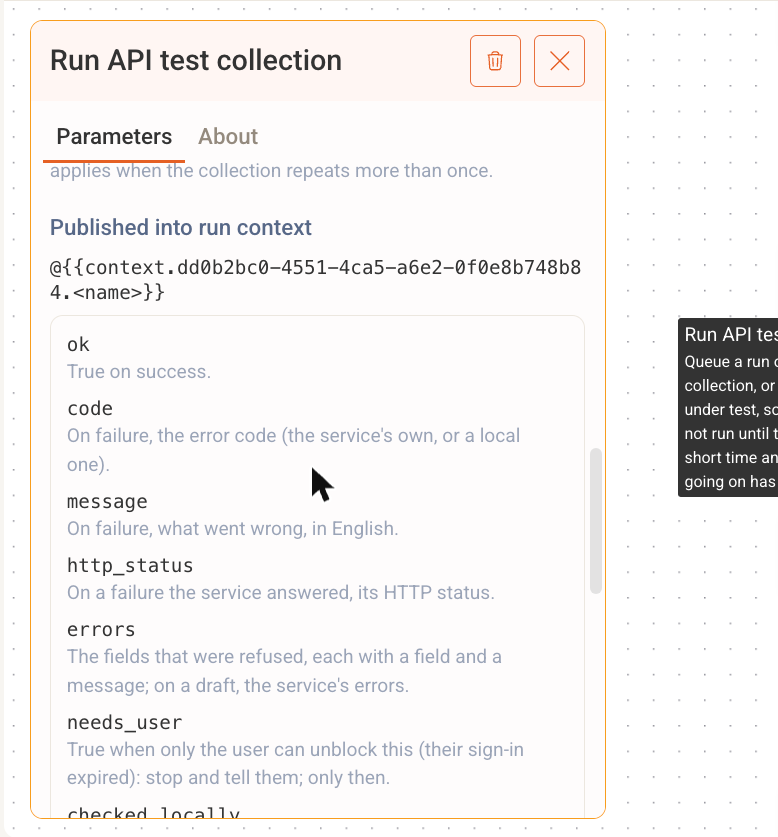
"Published into run context": the output names and their meaning.
| Name | Meaning |
|---|---|
| ok | True on success. |
| code | On failure, the error code (the service's own, or a local one). |
| message | On failure, what went wrong, in English. |
| http_status | On a failure the service answered, its HTTP status. |
| errors | The fields that were refused, each with a field and a message; on a draft, the service's errors. |
| needs_user | True when only the user can unblock this (for example their sign-in expired). |
| checked_locally | True when the call was refused before it reached the API Test service. |
| runs | One entry per pass: run number, status, version, environment name and the run's id. |
| results | One per run: run number, status, finished, outcome, counts, cases and run id. result_not_read when the result could not be read. |
| finished | True when every run has finished. |
| passed / failed / blocked / skipped | Case counts, summed over every run. |
| run_group_id | The id of the group of runs queued together. |
Results in the workflow's Run History
The Run History tab shows Runs · 28 days, Success Rate, Average Duration and Failures, and below them the 28-day table (Start, Trigger such as Manual or Chat, Duration, Snapshot, Status, and API Tests → View results).
View results opens Run results for that workflow run: Passed, Failed, Blocked, Skipped and Pass rate, and one row per API Test node. A node that did not run shows Not reached or Could not run with the reason code.
| Element | What it shows |
|---|---|
| API Tests column → View results | Opens a Run results panel under the table for that workflow run, with Back to run history and Clear. |
| Counts and pass rate | "Counts are test cases across every API Test node of this run, not workflow runs." Buttons: Expand failing, Expand all, Collapse all. |
| Node rows | The node name, a status such as Not reached or Could not run, and the P/F/B/S counts. A node that could not run shows the reason, for example VALIDATION_FAILED: You don't have permission to View Environment (API Test) in this project. |
| Node result card (when a node is opened in the run) | Collection, Version, Environment, Duration, Pass rate and Cases. "This node did not fail the workflow." Failed cases never fail the step; a Condition node after it can read the result and decide. If the run is still going: "Still running when the workflow read it. The full report has the final result." |
| Open full report in API Tests | Opens the complete run. Assertion detail, the redacted request/response and log-check evidence live in the API Tests module. |
The run also appears in the collection's History with trigger WORKFLOW (see Results, history and reports).
